
TL;DR
Python example here. Git repo updated 13 Feb 2024.
NZTM to Web Mercator
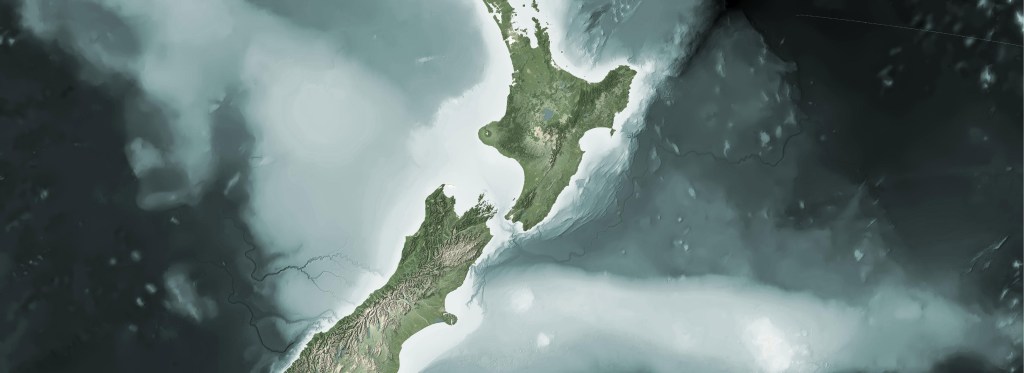
There are a number of times when I am building a web map when I need to warp a GTiff across the anti-meridian. New Zealand sits at the edge of this line, with a portion of it on the other side, The Chatham Islands. Doing a direct gdalwarp from NZTM (2193) to Web Mercator (3857) will “split” the file with the portion across the anti-meridian being placed to the other side of the projection.
Doing a straight warp from NZTM to Web Mercator:
gdalwarp -s_srs EPSG:2193 -t_srs:3857 in_tif.tif webmer_out_tif.tif
produces the following:

The short description is this:
The goal is to get the extents in Web Mercator for your GTiff that cross the anti-meridian. These extents can be passed to gdal.Warp as the output extents in your warp command
A Github repo with an example script can be found here. The code is intentionally verbose to help keep track of what is happening along the way.
The example uses Python and a number of available libraries, including:
The real star of the method is Fiona. Fiona has a method in the command that allows reprojection across the anti-meridian: antimeridian_cutting=True. When using this, fiona will output a multi-polygon in two pieces similar to the image above. Using the individual extents from each polygon in the multi-polygon, the extents can be leveraged to reconstruct a polygon across the anti-meridian. The reconstructed polygon extents can then be used as the output extents of you gdalwarp operation.
A little more in depth:
- Find extent of input file
- Reproject this extent to WGS 84 using
fionawithantimeridian_cutting=True. This creates a multi-polygon - Find extent of each multi-poly
- Shift left polygon over anti-meridian, next to right polygon
- Build extent of polygons combined
- Reproject WGS polygon to Web Mercator
- Shift maxx of Web Mercator polygon across the anti-meridian
- Find extent of new Webmercator polygon
- Use new extent as output bounds in
gdal.Warpprocess
Again, here is link to the repo with an example.
The example in the repo uses data from National Institute of Water and Atmospheric Research (NIWA) in New Zealand. You can get a download of the example data via Koordinates here.
Normally, I would try to build the code in the blog post, but the example too large. Also, I usually try to break down all the import highlights in the code; however, there is just too much to cover in the method. Hopefully, this will get you a little further along.




 XYCarto